Understand your car. Here’s how it helps.
Eleven things Common Sense Auto does for you. Tap any one to see how.

Demo vehicles and sample records. Nothing here saves to a real account.
Watch it work
Mechanic Checklist
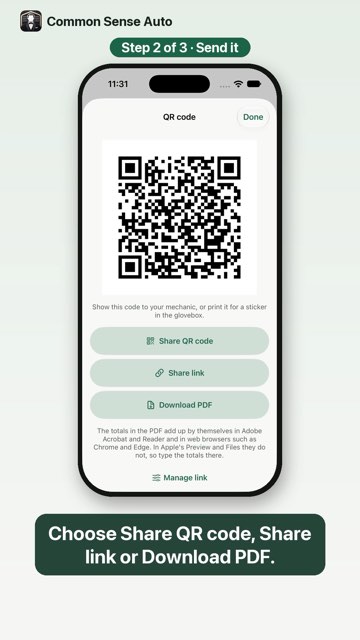
Take your car’s to-do list to the shop.VideoSee howShow your mechanic a QR code. They fill in the work and prices on their phone, and you get the report back in your records.
- One tap, one QR codeTap Mechanic link and show your mechanic the code.
- No app, no accountThey open it in any browser and see what is overdue, due soon and coming up.
- Prices on their phoneParts, shop labor rate and hours, with the math done. Fees and tax in one block.
- The report comes backA notification, then a PDF in your Documents named for the shop, the mechanic and the date. Undo it any time.
Real screens, made-up 2019 Honda Accord
Swipe or scroll for more
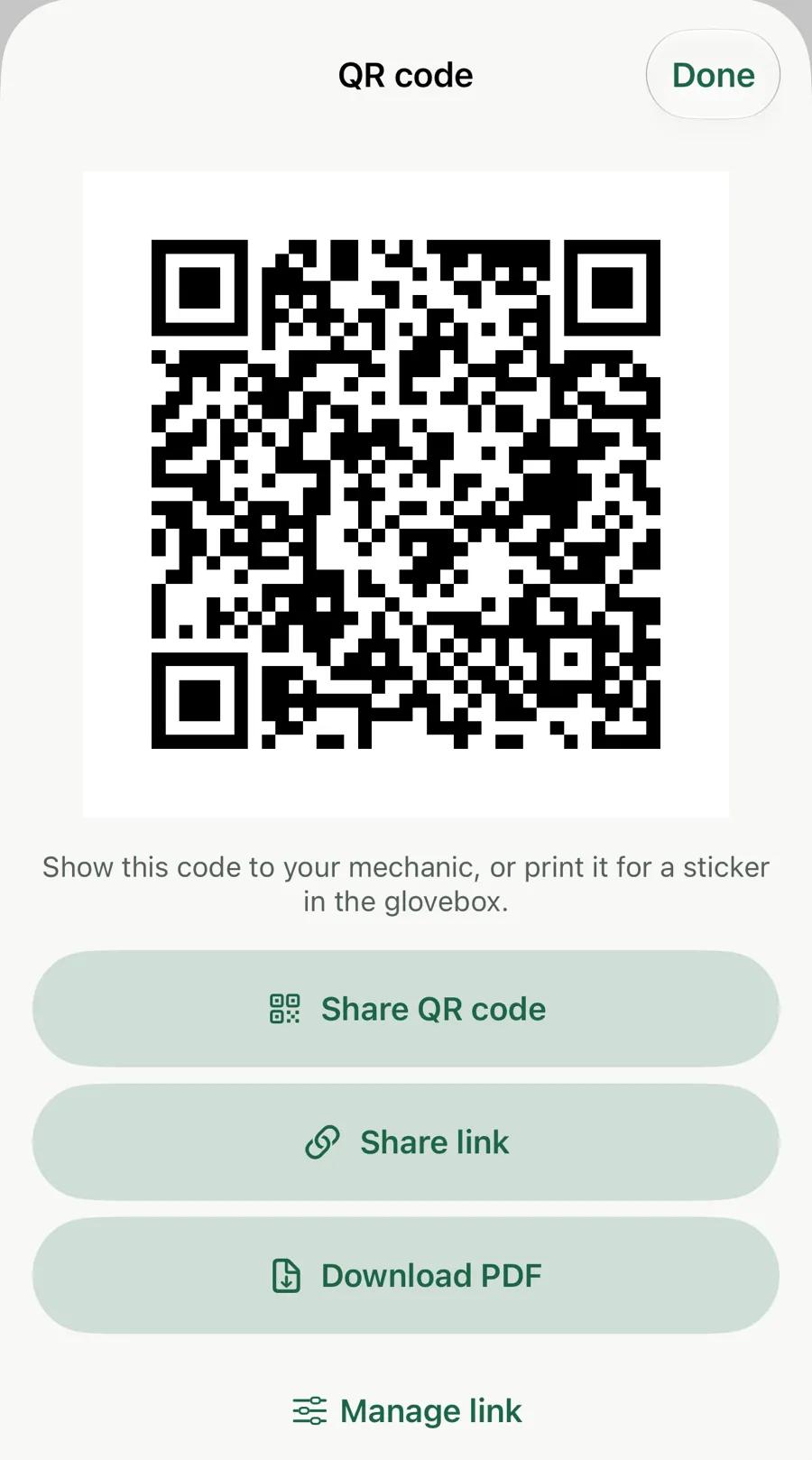
1In your app One tap. One QR code. Show it, share it or print it. 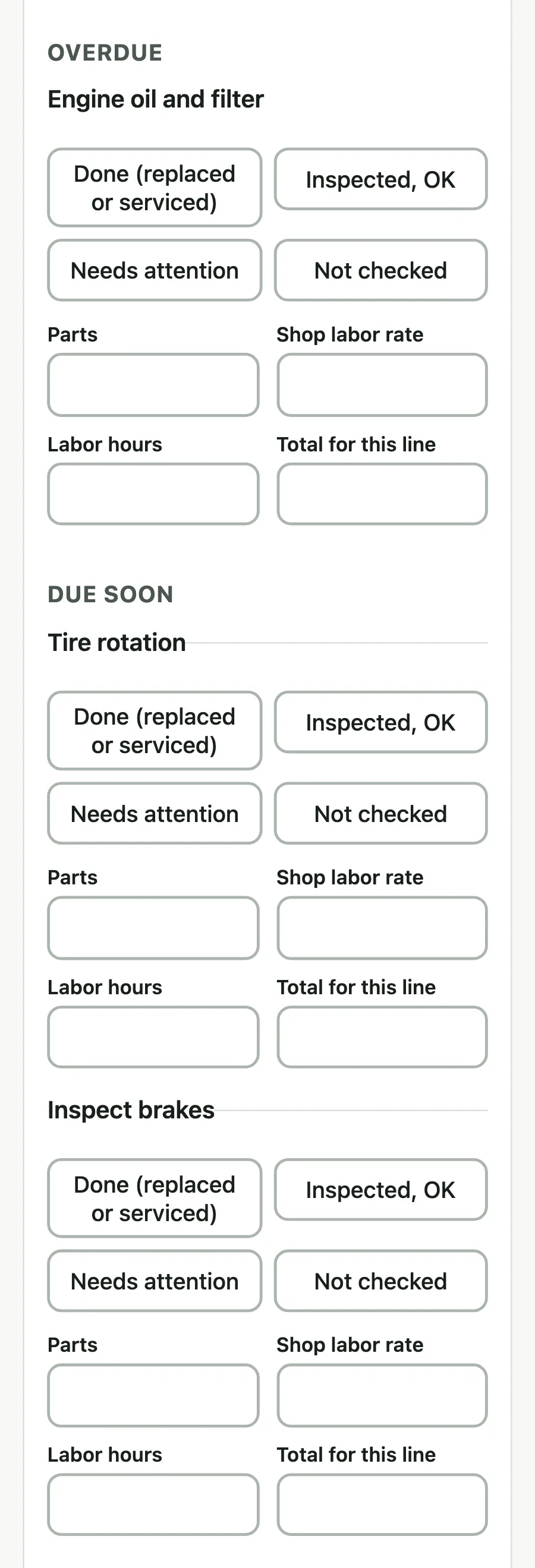
2On your mechanic’s phone They see what is Overdue, Due soon and Coming up on your 2019 Honda Accord, with boxes for the prices on every line. 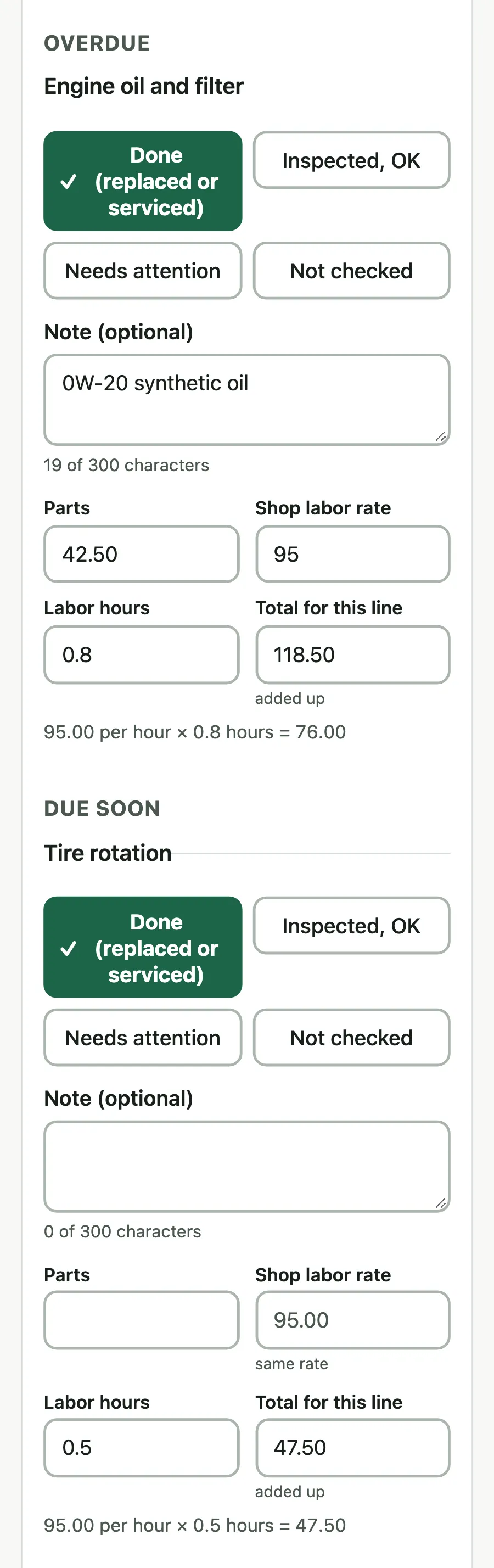
3On your mechanic’s phone Parts, shop labor rate, hours. The page does the math, so nobody needs a calculator. 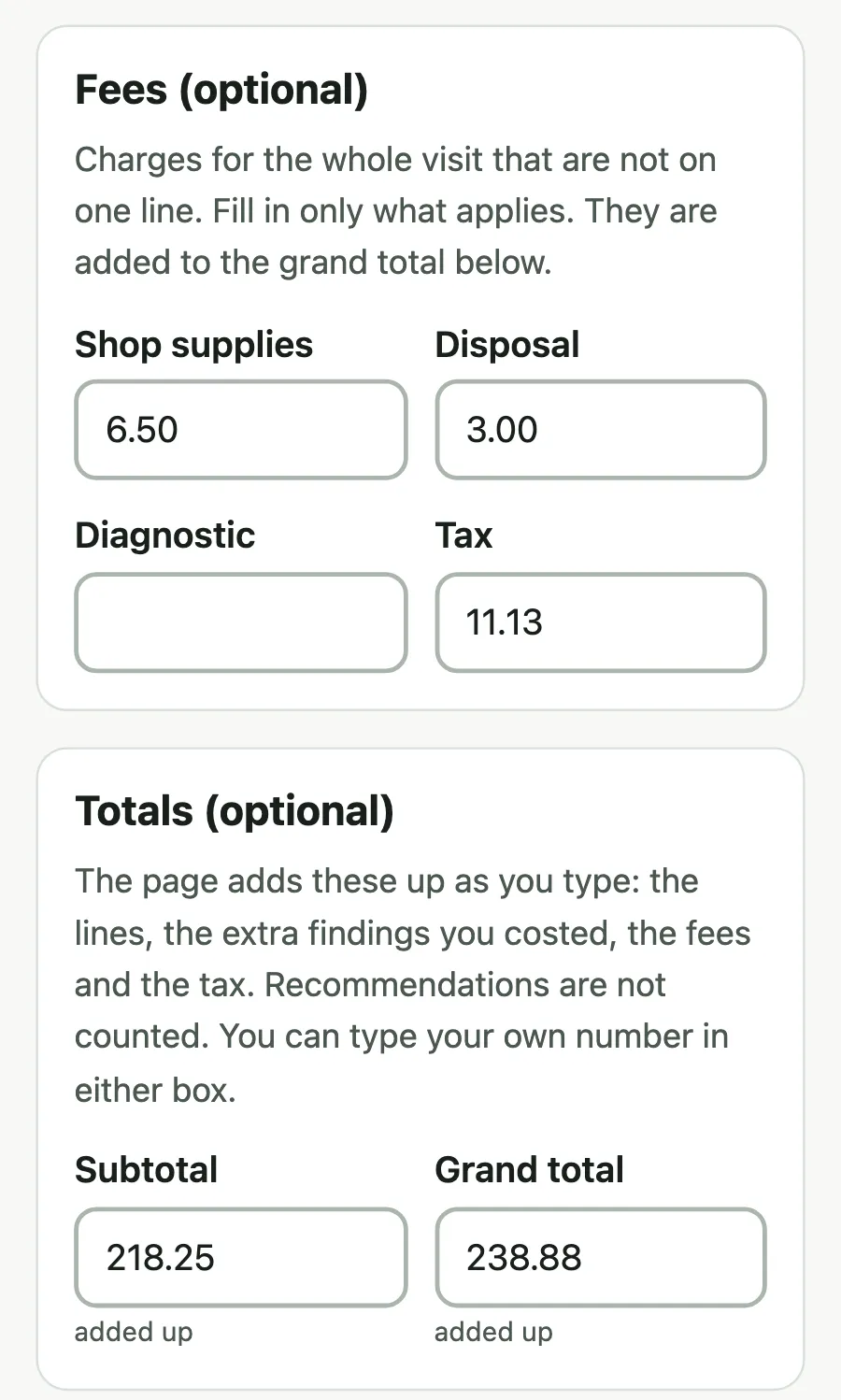
4On your mechanic’s phone Fees and tax go in one block. Subtotal and grand total add up as they type. 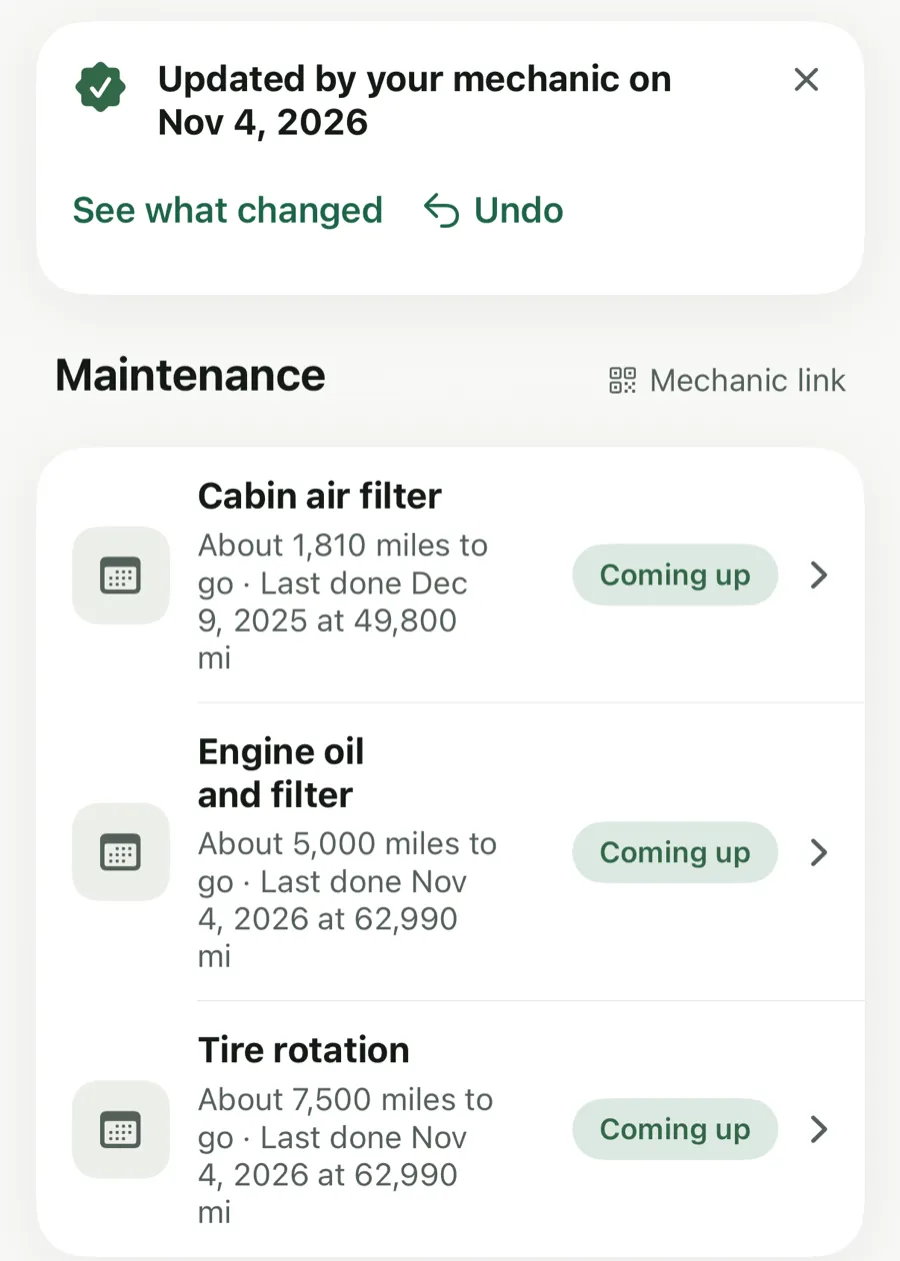
5In your app You get a notification, and your schedule is already updated. 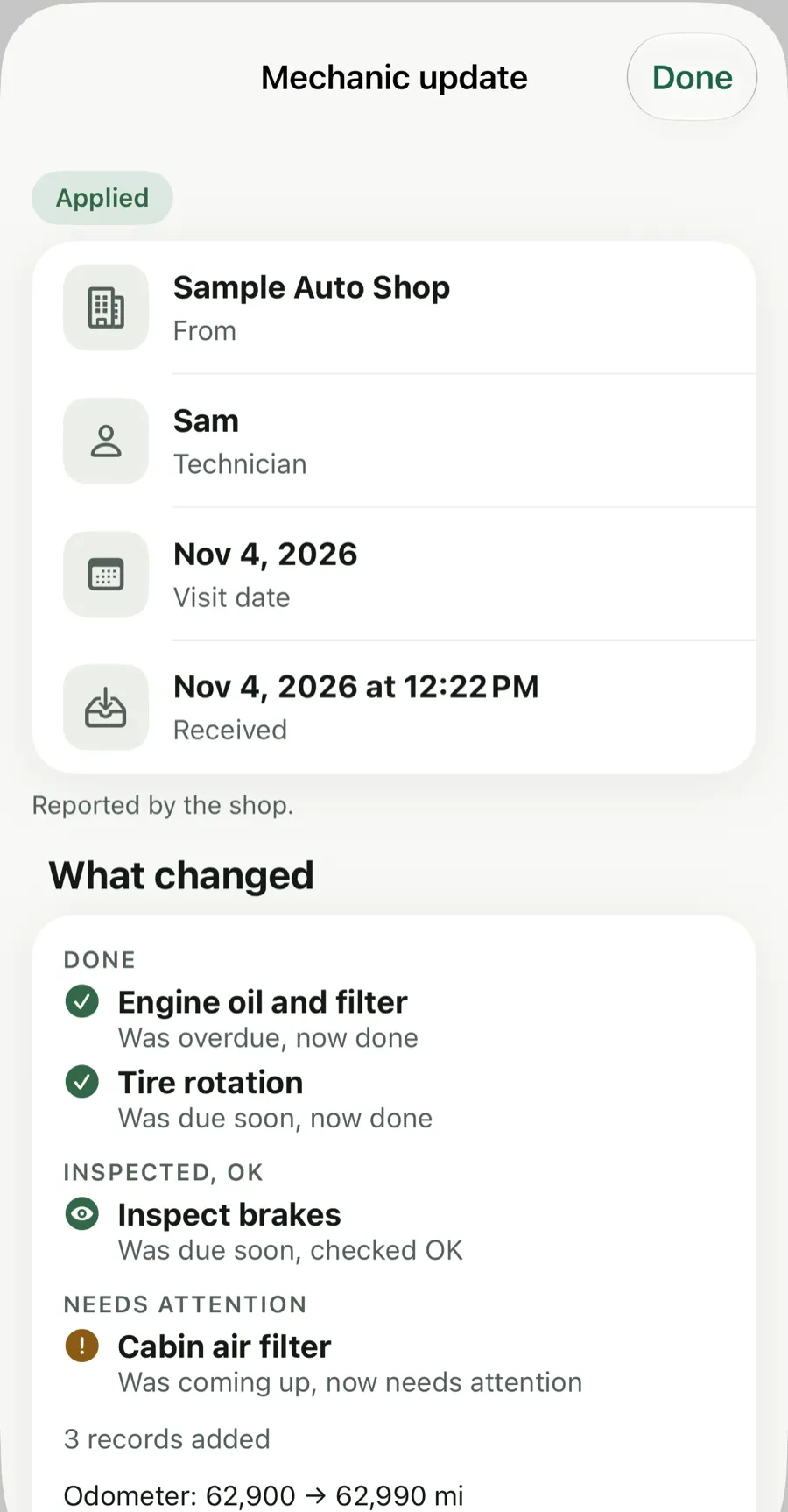
6In your app See what changed, line by line. It says it is the shop’s report.
- A list to work from, not a diagnosis. The amounts are whatever the shop types in, and the report is marked as the shop’s own.
- You make the link in the app, so this website can’t make one. Prefer paper? Download PDF gives a checklist to print.
Watch it in the app
Watch on YouTubePlays from YouTube only when you press play. Demo note The pictures are the app’s own screens and the mechanic’s page, made with a made-up 2019 Honda Accord, so you can’t make a link from this website.
Trip Planner
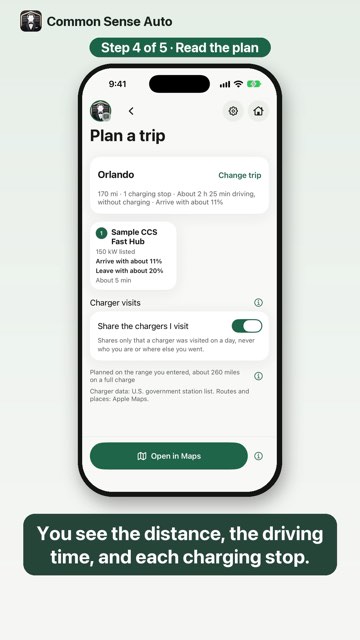
EV charging with Common Sense.VideoSee howPick a destination. Get fast-charging stops that fit your car’s plug.
- Battery on arrival, at every stop
- Fast chargers that fit your plug
- The plan with the shortest estimated time
Battery levels and times are estimates.
Real app screens, made-up places. Swipe or scroll for more
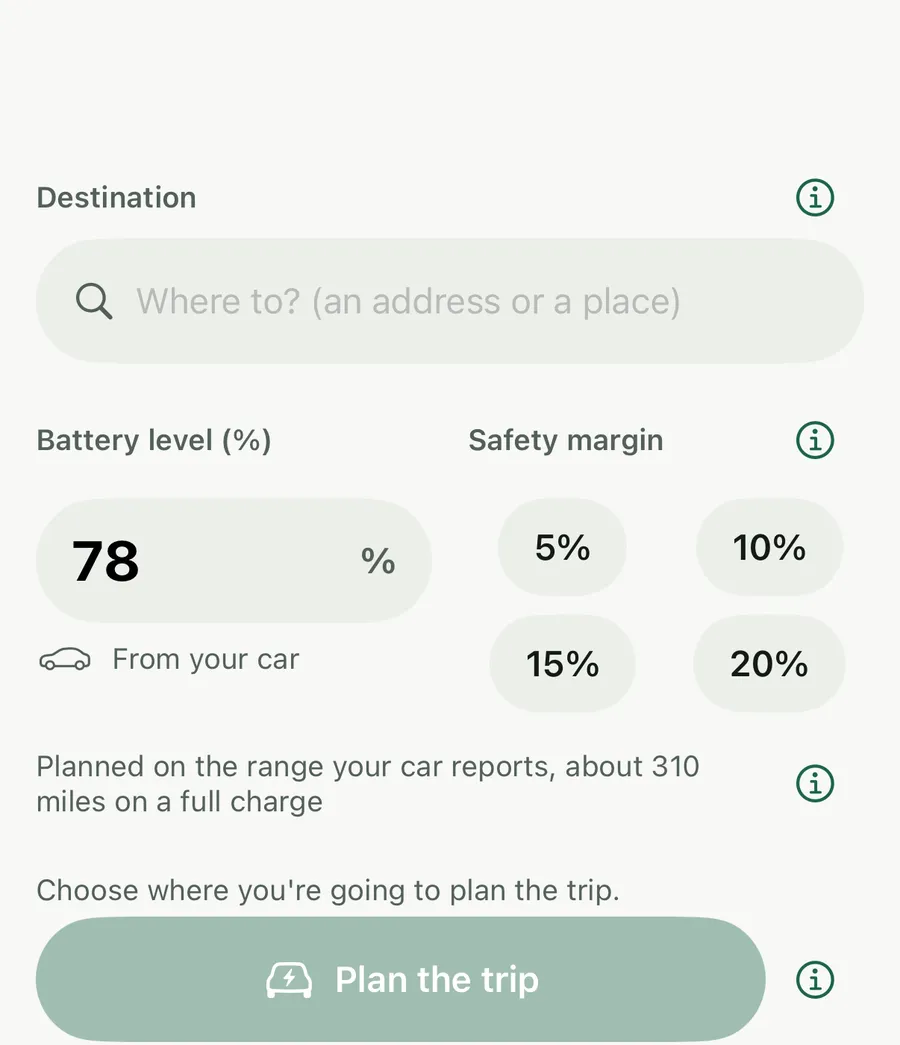
1Your car fills in the battery. 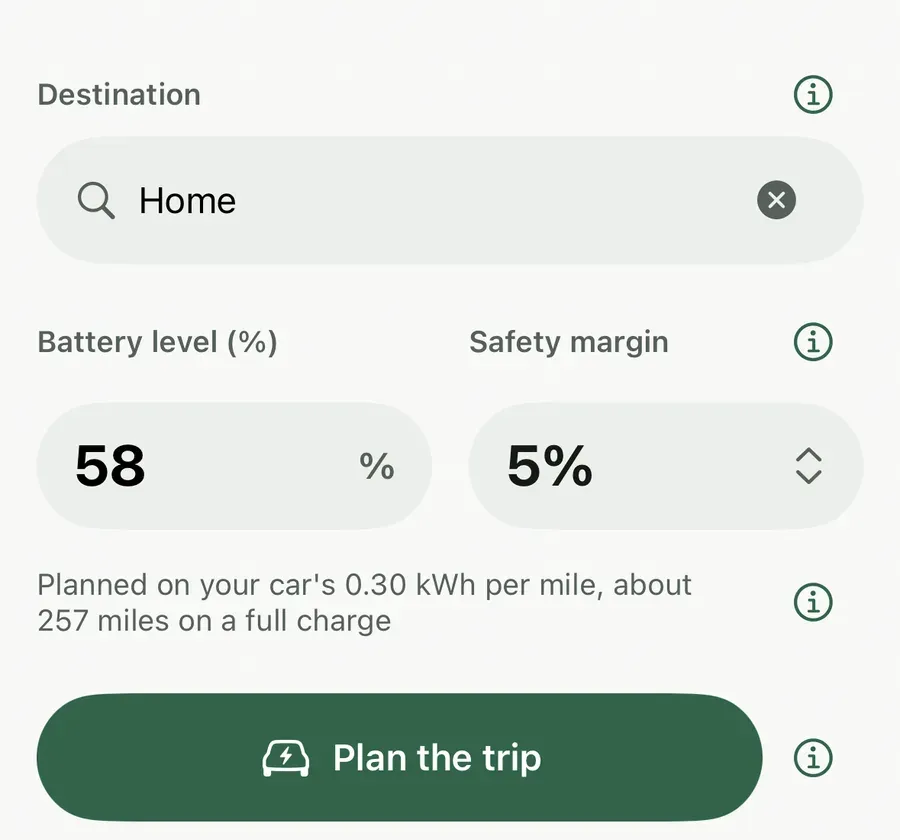
2Say where to. Pick your safety margin. 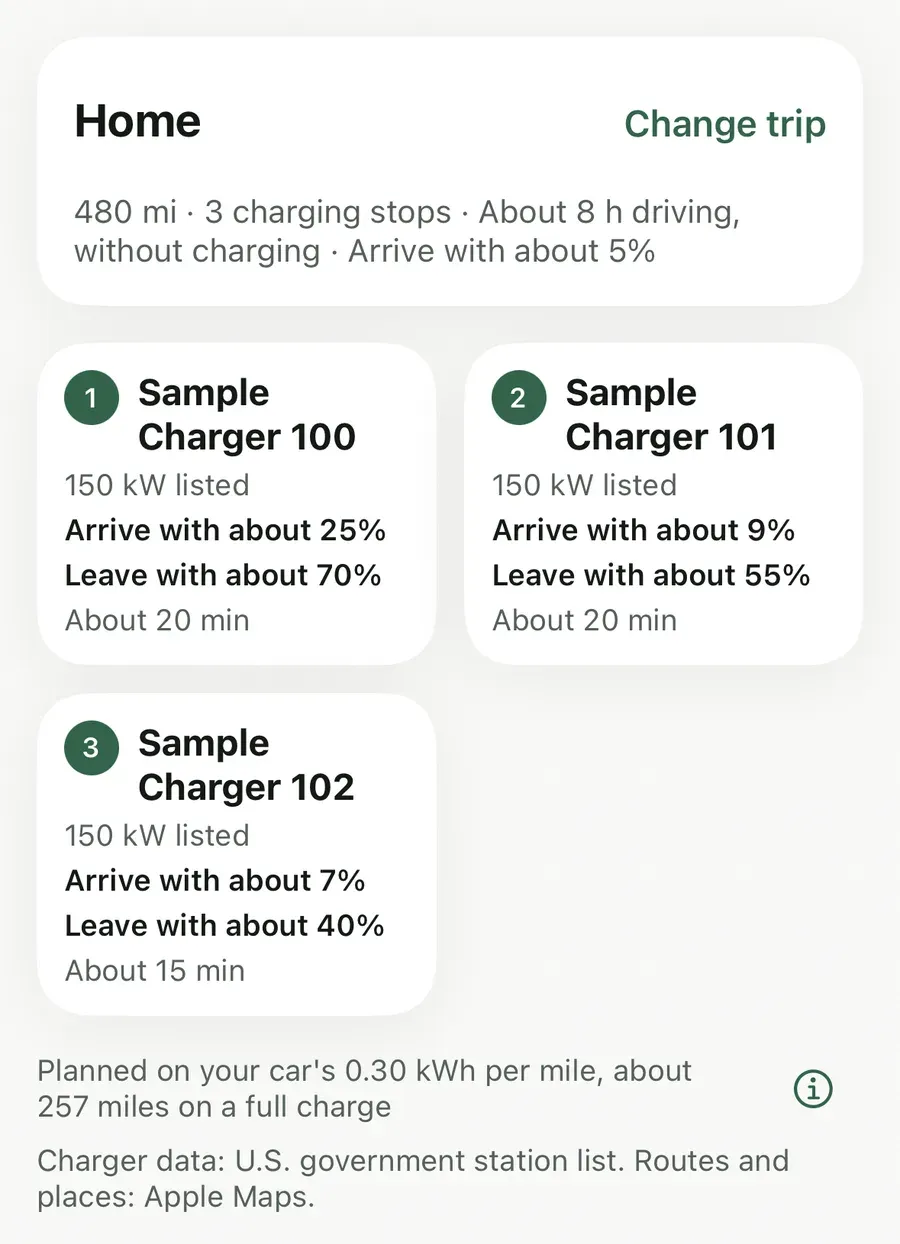
3Every stop, with the charge you arrive with.
Watch it in the app
Watch on YouTubePlays from YouTube only when you press play. Demo note The pictures are the app’s own screens, with made-up places and chargers. This website can’t plan trips.
Connected Car
Let your car fill in the numbers.See howConnect a supported car. The app reads its battery, mileage and warnings when you open it.
- Battery fills in your trip planPlan a trip starts with your car’s battery level already in the box.
- Mileage updates itselfOpen the app and your mileage follows your car’s odometer.
- Warnings reach youA warning your car reports, such as low tire pressure, shows on Home in plain words.
- Charging, watchedSee Charging now, and when it finishes, review and save the charge.
Real screens, made-up 2023 Hyundai Ioniq 5
Swipe or scroll for more
1Trip Planner starts with your battery level. 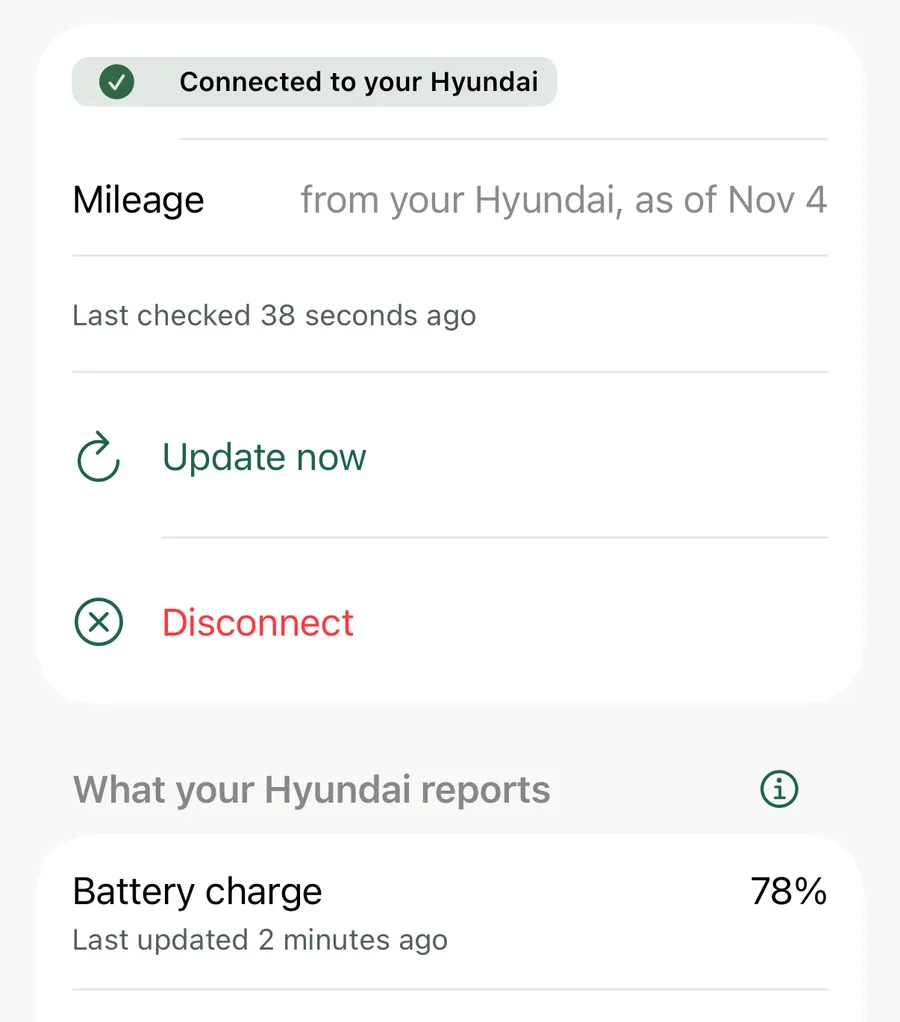
2Your mileage, from your car. 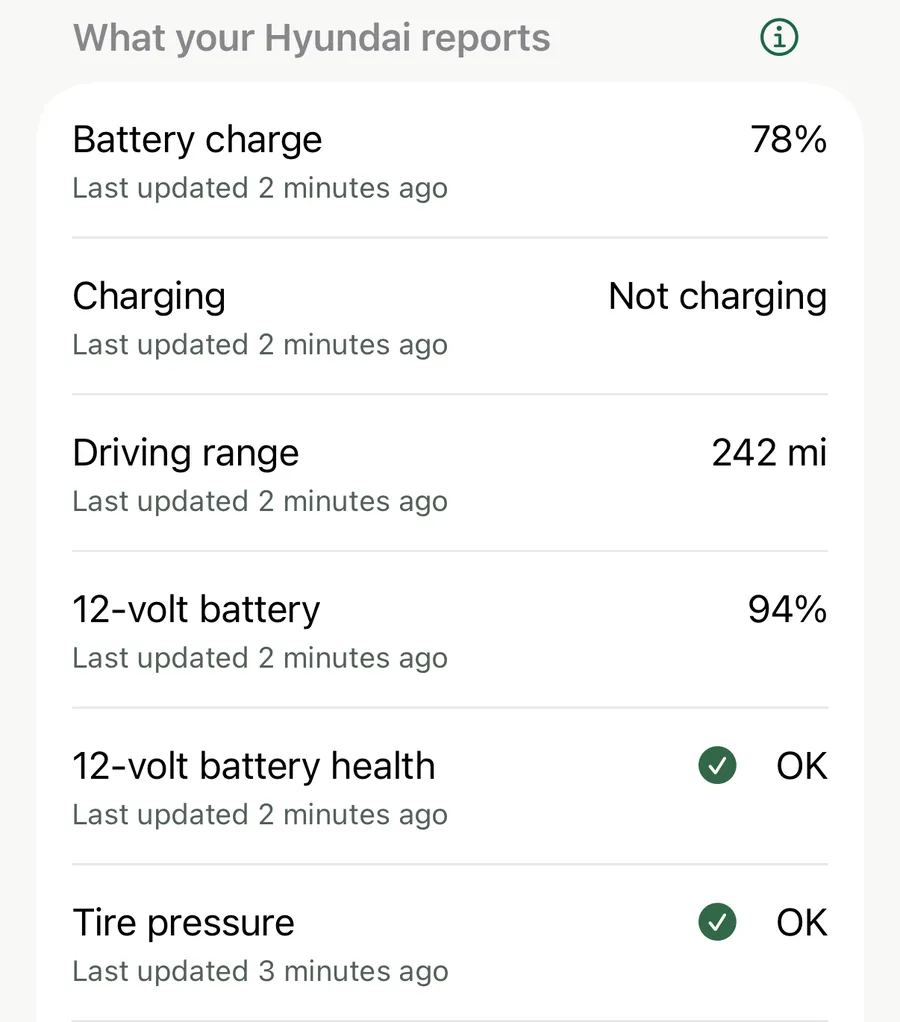
3What your car reports, in one list. 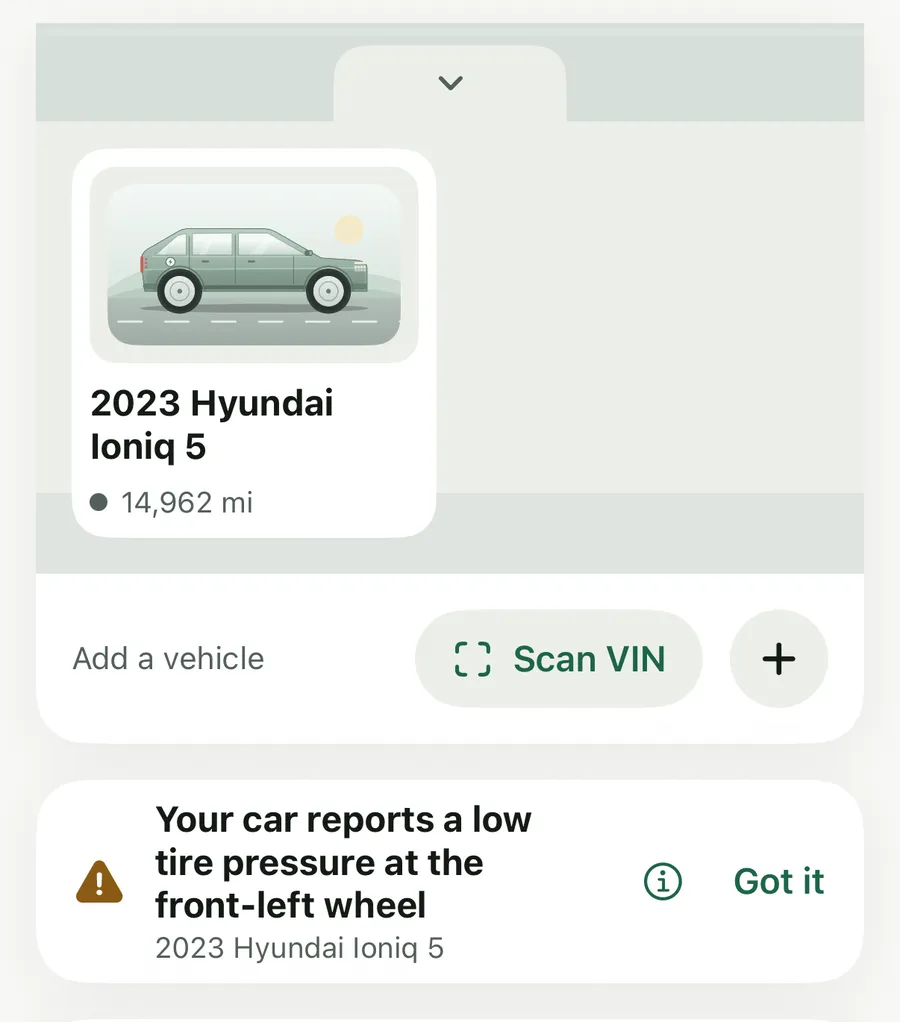
4A warning on Home. Tap Got it to put it away. 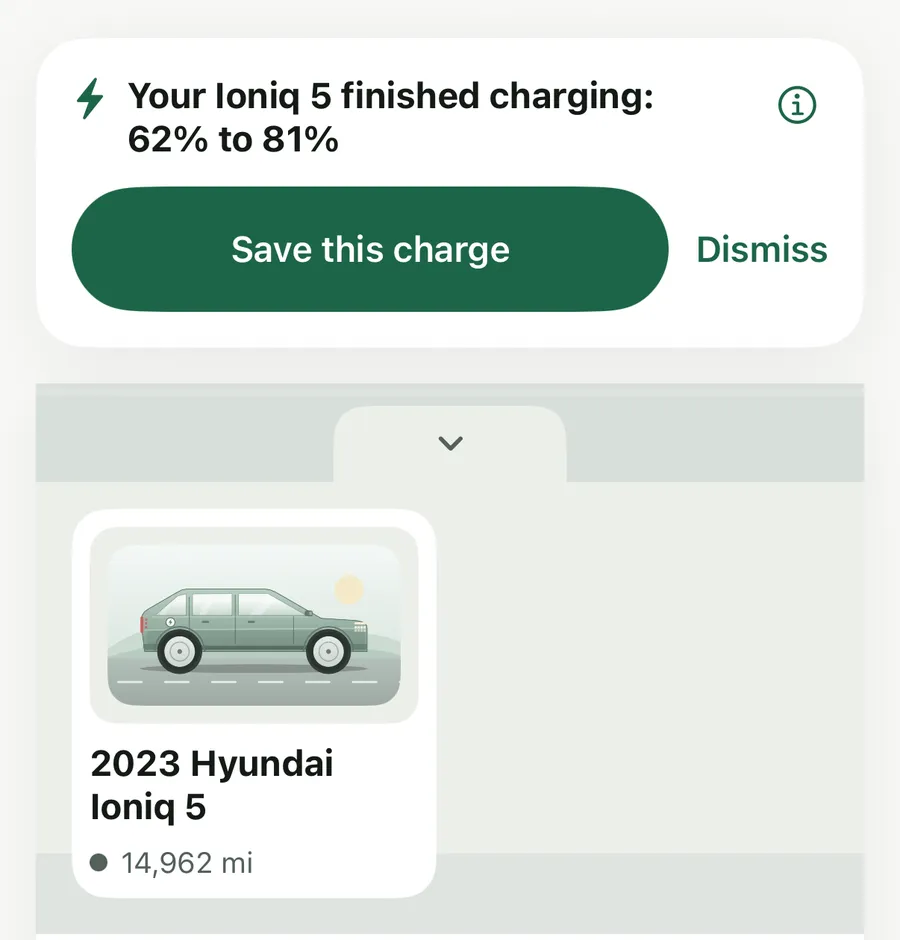
5A finished charge, ready to save.
- The app reads your car only when you open it, never all the time, and it does not read where your car is.
- A warning is the car’s own report in plain words. The app does not diagnose it or say what is wrong.
- Which readings appear depends on your car’s make, model and year. Smartcar supports many cars, not every one.
- You connect on Smartcar’s own sign-in page, so the app never sees your car maker password.
- Connected Car is an add-on, from $5.99 a month for one car you connect, on any plan. Connecting is your choice, and you can disconnect any time.
Demo note The pictures are the app’s own screens, made with a made-up 2023 Hyundai Ioniq 5, so this website can’t connect a car. You connect in the app and can disconnect at any time.
Garage Butler
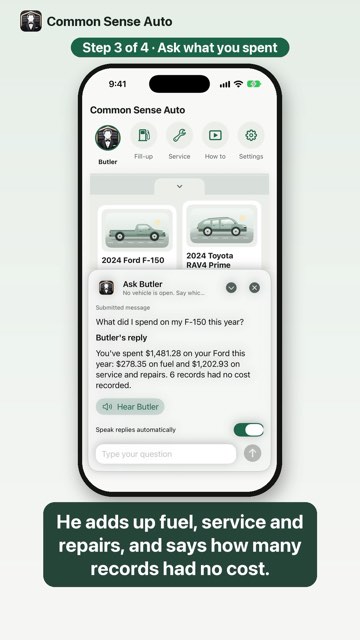
Your car has questions. Your Butler has answers.VideoSee howTalk or type about your car. Butler answers from that vehicle’s own records and never mixes in another one.

Garage ButlerAn illustrated character, not a real person
Illustrative data, not a live conversation
Watch it in the app
Watch on YouTubePlays from YouTube only when you press play. Demo note Butler runs in a demo garage with two sample vehicles, a Ford and a Toyota, and demo mileage. Its answers are scripted from sample records. Refreshing starts over, and nothing saves to a real account.
Repair Cost Estimator
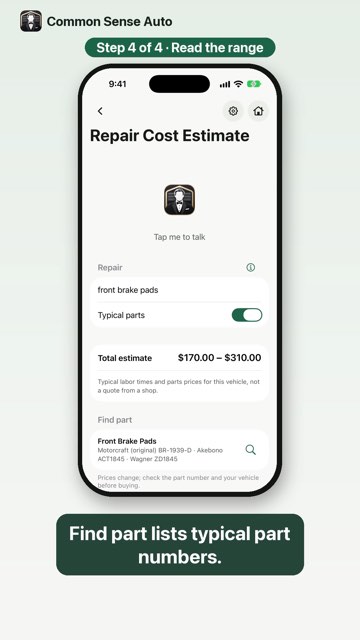
Understand what goes into a repair bill before you pay it.VideoSee howSee what goes into a repair bill: labor time, a typical shop rate, and parts, with how sure each number is.
GUIDE Hours from a labor-time reference. Example parts price
Front brake pads · 2022 Ford F-150
- Labor time
- 0.8–1.3 hours
- Typical shop rate
- $100–$160 an hour 2025 surveys of US repair shops. Your shop’s rate will differ
- Parts
- $50–$95 Example parts price for this demo, not a listed price
- Labor
- $80–$210
- Estimated total
- $130–$305
A guide, not a quote. Taxes and shop fees are extra.
Watch it in the app
Watch on YouTubePlays from YouTube only when you press play. Demo note One job on a 2022 F-150. Hours come from a labor-time reference; the rate is a typical range from 2025 shop surveys; the parts price is an example for this demo, not a listed price. It is a guide, not a quote.
Maintenance
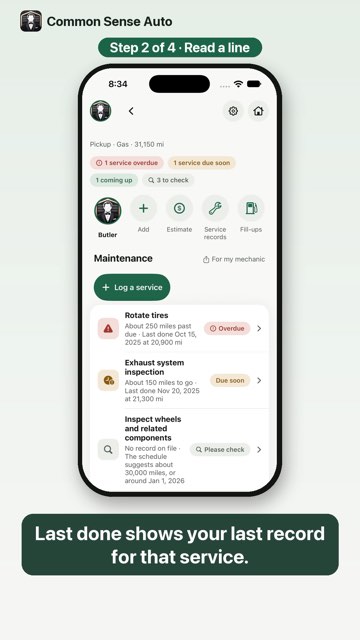
Know what needs attention before it becomes an expensive surprise.VideoSee howAdd your car and its mileage, log past service, and see what is due now, due soon or coming up. Or ask Butler what is due. With the Connected Car add-on, connect a supported car on Smartcar’s own sign-in page, so the app never sees your car maker password, and its odometer updates itself. A connected car also lists what it reports, such as tire pressure, and Home shows a short “Your car reports …” line when it reports a warning. The app does not diagnose a warning or say what is wrong, does not read where your car is, and reads your car only when the app is opened, not continuously. Smartcar supports many makes and models, not every one.
Choose a sample vehicle for this card
This page shows the 2024 Ford F-150. Choosing another sample vehicle needs JavaScript.
SAMPLEMade-up records for a made-up owner, with hand-written sample reminders.
Sample maintenance schedule
2024 Ford F-150
3.5L V6 EcoBoost · Gasoline · 4WD
Most urgent item with a record
Tire rotation
Due now
Sample reminder: this is due now.
- Last logged serviceMay 14, 2025Tire rotation · 12,310 mi Owner entered
- Sample odometer31,420 miAs of Oct 1, 2026 · 19,110 mi since that service Common Sense calculated
- Next manufacturer milestoneNot available in this previewNo manufacturer interval is loaded, so no target is guessed.
The status is a sample owner reminder written by hand, so it is illustrative. It is not worked out from the manufacturer’s schedule and it is not a mechanical assessment.
Also on this sample list (4)
- Engine oilLast logged Mar 2026 · 26,880 miDue soon
- BrakesLast logged Jul 2026 · 29,970 miUpcoming
- Cabin air filterLast logged Nov 2025 · 21,540 miOn track
- Brake fluidNo record in this sampleNo record
SAMPLEMade-up records for a made-up owner, with hand-written sample reminders.
Sample maintenance schedule
2024 Toyota RAV4 Prime SE
2.5L I4 · Plug-in hybrid · AWD
Most urgent item with a record
Engine oil
Due soon
Sample reminder: this is coming due soon.
- Last logged serviceDec 29, 2025Oil change · 16,010 mi Receipt confirmed
- Sample odometer22,310 miAs of Oct 1, 2026 · 6,300 mi since that service Common Sense calculated
- Next manufacturer milestoneNot available in this previewNo manufacturer interval is loaded, so no target is guessed.
The status is a sample owner reminder written by hand, so it is illustrative. It is not worked out from the manufacturer’s schedule and it is not a mechanical assessment.
Also on this sample list (4)
- BrakesLast logged May 2026 · 20,450 miUpcoming
- Tire rotationLast logged Aug 2026 · 21,850 miOn track
- Brake fluidNo record in this sampleNo record
- Cabin air filterNo record in this sampleNo record
Example timeline, sample data
- Aug 2026Battery replacement
30,540 mi · Invoice confirmed
- Jul 2026Brake inspection
29,970 mi · Invoice confirmed
- Mar 2026Oil change
26,880 mi · Invoice confirmed
Watch it in the app
Watch on YouTubePlays from YouTube only when you press play. Demo note The sample card uses hand-written reminders and does not work out a manufacturer milestone. In the Butler demo, maintenance uses saved maintenance schedules for the four demo configurations. This website can’t connect a car.
Track & Save
Your miles, your fuel, your money, all making sense.VideoSee howLog fill-ups and charging sessions, start and stop trips yourself, and see what your car costs to run. When a connected electric car finishes charging, the app can offer to save it as a charge record, filled in with the date, odometer and battery level, and an estimated kWh when your battery size is known. Nothing is saved until you review the form and save it.
Sample, made-up records
2024 Ford F-150
- Fill-ups3
- Fuel bought38.7 gal
- Spent$139.32
Common Sense calculated Added up from the sample fill-ups.
Sample, made-up records
2024 Toyota RAV4 Prime SE
- Sessions4
- Electricity added42.2 kWh
- Spent$6.33
Common Sense calculated Added up from the sample charging sessions.
Sample, made-up records
2024 Ford F-150
- Trips9
- Business94 mi
- Personal160 mi
- Commuting72 mi
- Unclassified74 mi
Common Sense calculated Sep 5 to Sep 30, 2026. Trips started and stopped by hand. Commuting stays apart from business.
Example annual costs, sample data
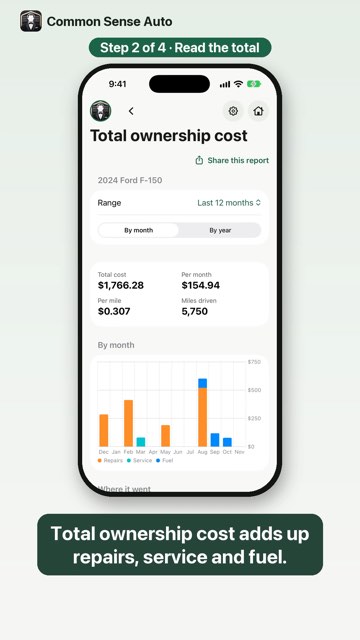
Example costs recorded in 2026$699.32Added up from made-up sample records. Not a repair estimate and not a Common Sense Auto price.- Maintenance$159.00
- Repairs$189.00
- Fuel$139.32
- Other$212.00
Watch it in the app
Watch on YouTubePlays from YouTube only when you press play. Demo note Sample records only. Tracking is manual: this site does not use your location or promise automatic trips, and you cannot log your own records here.
Business Usage Reporting
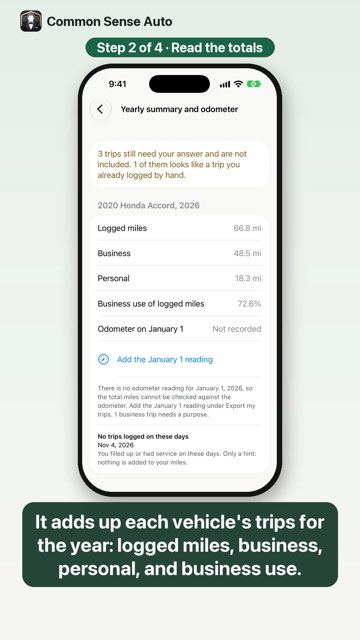
Drive for work? Let your records do the paperwork.VideoSee howStart and stop your trips, add a purpose, and review the report. Missing information is flagged, and a business share is shown only when trips account for every mile.
Sample, made-up records
2024 Ford F-150
- Recorded business share23.5%
- Business miles94 mi
- Unclassified miles74 mi
Common Sense calculated Sep 5 to Sep 30, 2026. Unclassified miles are never assigned. Not a deduction.
Watch it in the app
Watch on YouTubePlays from YouTube only when you press play. Demo note The sample page uses made-up records and is not connected to a live report service. It organizes records. It is not tax advice, IRS approval or a guaranteed deduction.
Pre-sale Report
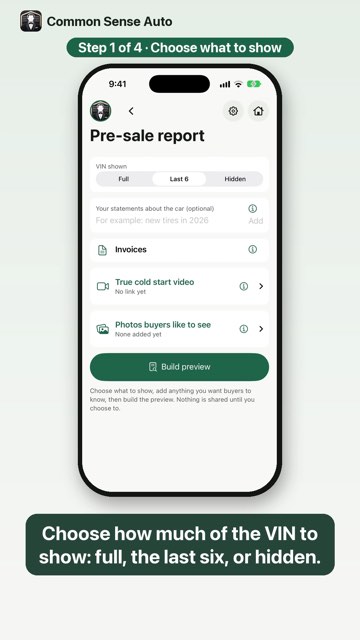
Give buyers the story behind the car, not just the asking price.VideoSee howKeep records as you go. When you sell, share one PDF with your service history, every invoice saved for the car, a link to your video and your car photos. Each record shows its source, and gaps are listed as unknown.
Sample report, made-up records
Pre-Sale Vehicle Report2024 Ford F-15031,420 mi on the sample odometer · Prepared by a sample owner- Service records6
- With an invoice or receipt label4
- Amounts written down$390.00
- Battery replacementAug 12, 2026 · 30,540 miInvoice confirmed
- Brake inspectionJul 9, 2026 · 29,970 miInvoice confirmed
- Brake fluid: no recordThe report says so instead of guessing.Unknown
Common Sense calculated Counts and totals are added up from the sample records. The report shows what can be documented. It does not certify mechanical condition.
Watch it in the app
Watch on YouTubePlays from YouTube only when you press play. Demo note Sample reports for the four sample vehicles use made-up records, with no invoice pictures or car photos. In the app, you choose the video link and photos, and they are optional. A report shows what can be documented. It does not certify mechanical condition.
Vehicle Documents & Receipts
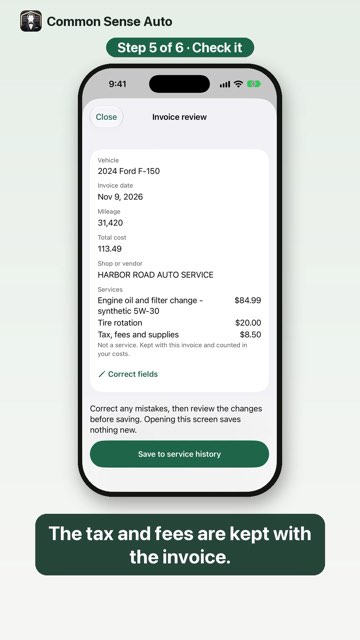
Got a glovebox full of papers? Hand them over. We’ll sort them out.VideoSee howPhotograph a receipt or invoice, or choose a PDF. You see what was read, correct anything wrong, then confirm. Nothing is saved without your confirmation. A parts receipt does not show the parts were installed, and an estimate is not completed work.
Example receipt review
Ready for your reviewOil change
- Date
- May 9, 2026
- Mileage
- 61,010 mi
- Total
- $89.50
Check and correct the details before saving.
Watch it in the app
Watch on YouTubePlays from YouTube only when you press play. Demo note This website does not read, upload or save real documents. The screen below is a made-up example of the review step.
DiagnosticsBETA
Tell us what your car is doing. We’ll help you figure out what to check next.See howDescribe what you notice and see plain next steps. A symptom is not a confirmed diagnosis.
Illustrative example, not a diagnosis
What are you noticing?
- Squeaking or grinding
- Shaking when braking
- Weak braking
- Soft or sinking brake pedal
- Routine maintenance
- I’m not sure
You can also type something else. A symptom is not a confirmed diagnosis.
Demo note This is an illustration. If braking feels weak or the pedal sinks, it says to stop driving safely and get professional help.